Søk i denne bloggen og Lenker

Viser innlegg med etiketten olympus E450. Vis alle innlegg

fredag 12. august 2016

The Joys and Challenges of Yachting Photography

Photographing boats and races is another kind of obvious side hobby, and indeed you can read more on my sailing exploits and ponderings themselves at Lost Sea Soul. I have enjoyed taking shots of regattas but often yearned rather to be out sailing in those very regattas. Last weekend I had the opportunity to have my cake and eat it, being out in a RIB one day down the Norwegian "Riviera" and then crewing on a 12mR the other.

It reminded me of the challenges of both disciplines - team work, stregnth and wisdom on the one while a sense for a composition and wisdom on the camera side.


The biggest challenge in sailing photography to me is not having a water resistant camera. For others it is likely to be getting close enough to the action or being able to predict when the most exciting and interesting shots can be captured. The first is fixable with either a different camera system, Pentax and Olympus offering mid end weather sealed systems, while on the other, asking some spectators or race organisers what is going to happen can solve problems of where to stand on the shore, or where to go on the water in a motor boat to catch those shots.

My other challenge is not really my own- it is the percieved need for new fangled stuff all the time and how much more "obsolete" camera bodies are considered these days after they are but a few years old. When i started SLR 35mm photography, you would see a lot of older folk with good Nikons and Canons from the early 70s slung around their necks, seperate light meter round their wrists. There was also the OM revolution and the followers at Pentax and Ricoh. All before we went all "electronic operating system" and then much worse, APS film cameras were pushed onto the market to the detriment of photography in general. These days many hobby photographers think it laughable that I persist with a body launched 7 or 8 years ago, but as I stated before, it is way in excess of what was available to me in the 1980s.

Main system equipment aside, what do you need for a good day's yattin' phottin'?

Firstly you don't necessarily need a boat or loan of a boat. You do then need to be within reasonable distance of sailing, and that means either knowing that the racing is at least in part, going to come near land, or positioning yourself at a natural narrows where boats have to sail regardless. Also another alternative is as I found out, to use local route ferries or tourist boats when racing or other 'muster regattas' are on, such as over to the Isle of Wight, Kilcreggan on the Clyde, Syndey Harbour or San Francisco bay area. How I cursed not having a good camera on the way past Alcatraz when a rather infamous I 14 sailor, "The Captain" Came shooting past the "Rock" in his high performance dinghy, bright spinnaker resonant in the mute californian colours.

Lens choice, given that you have them. Firstly for dock side photting a 28mm eq zoom or prime is quite sufficient and unlike the wider end, does not distort perspective so much on yachts that you become very aware of the wide treatment. For example - 28mm eq


A typical kit zoom in the range 28-85mm eq ff, will provide for on shore images not only dockside, and passing boats close by on the wide end, but what I really personally like and that is "in context" shots of boats in their often beautiful or interesting seaside land- or town -scapes. At the long end you will get kind of cut off shots though of boats racing at distances of a few hundred yards, which are neither between having enough background to give context nor enough detail to be a photo of a boat. The same will be true of primes in the eq nifty fifty 50mm to portrait semi telefoto, but the added speed of a fast prime at 120mm to say 150mm can make up for lack of composition freedom in capturing detail shots when boats are near enough.

When I say detail shots, this is often in the sailing magazines close enough to recognise crew members, which helps sell copy or gives an otherwise anonymous top competition boat, a relevant human face, such as the instantly recognisable handsome profile of Sir Ben Ainsley. Alternatively, they can be technical shots, which show either nice detail on a wooden boat, the motion of the boat in the sea, or particular action or mishap sequences. In harbour the "wide to mid" zoom will suffice, but for shots at greater distances you need to go up to higher telefoto ranges for both detail shots, and whole boat shots when they are further away up the racing course.

At the telephoto end, I have looked at my own EXIF focal mm, and some other folks on and off the water. From the land, I use quite a lot of 300mm for boats sailing on their race courses, but once out in a boat I find that the shots are split three ways in fact:

Whole boat circa 85mm


cropped action in context 100-120


Close up of action and crew 200- 220


The last shot is a bit misleading probably taken at about 80 actually, because we could drive close to them since they had finished racing and were enjoying the spinnaker run to the harbour. But usually this type of close up would be on the race course, keeping a respectful distance at 200mm approx. More on positioning and courtesay later.

I find the longer end off shore is pretty unworkable above 220mm because you usually are bobbing about in a RIB or small boat, so framing shots becomes difficult as can even getting focus on the boat rather than fore or back ground points.  With f stops on my kit being lower, the shutter speed drops too low on programme, or the images get too dark on S, or worse, if you have forgotten auto ISO then it bumps up high.

I recommend using shutter prioirty at base ISO, there is usually more light than you think at first and shadows and quarter tones can be lifted in post. Shutter speed wise, I find that I cannot get sharp images by in large at under 1/320th and prefer at least 1/500th. Remember if you have a fast lens that this will be pushing the aperture more open and reducing your depth of field, which can be an issue for example here :


If you look closely, you can see that the depth of field is quite shallow and the nice, shiny chrome winches are out of focus, while the hatch is sharp. Be aware to too thin a DOF with boats.

On exposure and light conditions, the vast majority of boats white or light coloured sails and also a large number have white hulls these days, and even ye olde varnished hulls reflect a lot of light. Also as mentioned there is a lot more light around at sea because so much reflects up from the water. I prefer to use a polarising filter which reduces reflections and total, scattered light from the sea and therefore that kind of odd brighter blue in images from the sea. This helps with texture of the sea, while also helping tone down the white of hulls and sails allowing more detail to come out. White, blocky hulls and sails detract from photos IMHO and a polarising filter is a good means to vastly reduce this glare, while maintaining a balanced exposure.

Of course a digital optimised polarising filter reduces the scene by up to -2EV.  Alternatively a ND (neutral density) -0.5 or -1.0 EV filter can be used to achieve some of the effect, and also open the aperture up just a little more to get thinner DOF on very bright days, when you want to throw the background.

Once on the water, in a small boat, it is pretty desirable not to change lens because no matter how waterproof the camera is, when the body cavity is exposed, it is highly vulnerable to water, and salt water is so much more dangerous. Filters can also be fiddely to mount while bobbing about, which is another advantage of a polarising filter because you can vary the darkness or density by rotating it.  Also given my tips based on years of photting myself and recent EXIF checks on some 'pro' flickr images, it is best to have a zoom lens with a range of around 80 to 250mm, and not change lenses.  "Big Whites" or those "Bigma" long telefotos with sub f5.6 apertures, are the reserve of either land based photting or being on quite a substantial vessel where roll and spray are minimal for the same weather conditions.

Camera techniques out of the way, as with any sports photography,  or landscape photography if you like context as I do, knowing your subject and what is about to happen next makes the difference between " i took some shots at a sunny regatta" to the "wow, see what we captured!" Direction of light and time of day are important, with the shadow cast by the sails to one side of boat something to either avoid or take advantage of. For the non sailor reading this, generally speaking boats under sail go through three interesting 'states' and do a couple of interesting manoevres in terms of action beyond "boat heeled over on water"

1. Beating - this means the boats have their white sails closely hauled in, with often elegant curves on their trailing edges. They are sailing up towards the wind, so you can work out where they are going to be next, as they zig zag in that direction.


From the front of the boat, approaching you is the best angle usually, with the bow wave and crew being points of interest, and worth taking multiple shots at high shutter speeds to select the most interesting wave or crew shots.

2. Reaching - This is when boats cross the wind at about right angles, and for many boat types this is their fastest point-of-sail. Often racing boats will have spinnaker up, and out to one side. Sometimes this angle can put a lot of pressure on the sails, and the helmsman is on a knife-edge of being overpowered and spun round into the wind in what is known as a "broach", in spectacular fashion sometimes. One note is that the boats will be sailing fast away from where ever you are stationed.

3. Running - Here the wind is behind the boat, and the white sails are either pressed out, often like "goose wings" on either side of the boat, or on many racing boats, the bright spinnaker will be most prominent, out to one side of the boat. Given a good light direction, then this can make for spectacularly colourful shots, and also with a degree of shadow with back light, interesting semi silouhette shots can be had. Here the light was failing, and I had a polariser on a non WR lens, so this is how it turned out, a little dark and flat:


The manoervres of interest racing boats do are

1) Tacking their bows through the wind in order to zig zag up to the direction the wind is blowing from

2) Gybing - the opposite, swinging their sterns through the wind with it behind them,  and changing sides with the sails, often in interesting fashion with the spinnaker up.

3) Starting - Most boat races have a common mass start, so the boats line up and start all at once. In competitive fleets this means a neat line of boats which is amenable to a 28-35mm from the water. It can be very difficult to spot a given boat btw. It is the sprint, the most stressed point in sailing and crashes do happen.

4) Taking up and down sails (hoist and drop/douse). Usually racing photographers get shots of the spinnaker work as it is a coloured, interesting sail and involves a lot of team work on deck to handle up and down- see image above of a boat 'fishing' with its spinnaker, while the crew do their best to haul it onboard again after it was droped. But other sails can be just as interesting.


Other Equipment 

I am going to invest in a second weather resistant camera, most likely the Pentax K series with a single, WR lens the 18-135 (just the ticket as it covers all my usual focal lengths, and with the latest 16 and 20 / 24 mpx sensors without AA filter, cropping can compensate for lack of 300-400mm reach) , but for those of you maybe either with a water proof DSLR or not, a second waterproof 'tough' camera like the Olympus TG4 or a good water resistant mobile can be a good option, despite the fixed or short focal ranges- here a boat is handy to 'leg zoom' near to the action, while often tough compacts and mobiles have a nice do it all 35mm FF eq focal legnth. 

Weather jackets for cameras are a good idea for any DSLR camera on the salty sea, because salt is not worth the risk of getting into your camera- a single tiny grain will destroy a sensor or lens mechanism. No amount of being careful will stop a sudden wave splash reaching you on a small, open boat. A full waterproof diving box may be a bit excessive, but if you have many thousands of spondoolics in equipment, worth perhaps the bother. Water proof 'kayaking' bags are a good idea too, just taking a single camera 'snout pouch' bag as I say on a RIB (rigid hull inflatable boat ) or the like,m you dont want to change lenses really at sea.

Tripods are ok for cruise liners, but on a small boat or busy public ferry alike, you are better with a monopod to add maybe that one to two stop benefit in steadyness, while also synchronising with the hull's movement on the water, so at least cancelling out your own body's weather leg movements and getting you used to when you will have the subject in frame as you bob up and down. IBIS/ILIS andbest shot selection, will generally speaking be enough to compensate in light conditions at mid shutter speeds for the combined effects of your boats' movement, your body's movement and the subjects movement. 

"Eplilogue" in a non Police Squad sense 

I hope this has been of some use and inspiration to sailors in particular, to get out and take shots of their sport from a motor boat or even land. Use your knowledge of how races operate to position yourself for the best images, and decide what type of shot you are setting up for. Remember to get out of the shadow side of the yacht or course unless you are looking for silhouette effects that is. Take bursts of photos in manoervres, when boats cross each other or if you are trying for a close up 'people shot' -. Otherwise for 'in context' shots or general shots, position yourself and wait until the boat is at the sweet spot, and perhaps use an exposure bracket series if light conditions have either high contrast or very flat light.  Remember to just check that the camera is focused on the points of interest or tracking the boat well, the dof is not too shallow on the subject, you are using shutter priority at say 1/500th or faster, that you are not overexposing white sails and hulls or getting that unatural 'denim' blue from the sea.

For the non sailor, get to know the basics of sailing and racing and look up some youtube clips to understand what boats are up to and when is interesting to get shots. Being on land may severly restrict you if there are no racing bouys near by, but 'narrow' sounds, harbour entrances or peninsulas can get you close to the action. As can using a ferry or tour boat if you cannot persuade someone to take you out in a boat and spectate actively.

Remember that a RIb infront of a boat racing can be both a destraction, a potential collision hazard and casue a wave as you gvet out of the way which can slow a racing boat down,so keep the engine running keep clear by several of their boat legnths , don't make large waves near competitors or which will roll through the whole fleet as you blast off to thge next spot or home with your 'catch'.

The safest and best places for photographing a race on the water are usually just outside the triangular or in effect diamond shaped racing course layed out with three bouys, sometimes it is just two. The 'diamond' shaped racing area in a typical race round marks, is usually about 20 times wider than the start line, and often the start line is half way up or at the 'foot' of the course in relation to the wind blowing down the middle. Best, safe spots outside this 'diamond' are usually to the left of the start line by 30 meters or so, being just slightly ofrward of the bows when they gather and start; being at the windward mark, longest up towards the wind direction where the boats turn and often hoist spinnakers, and being at the converse 'leeward' mark where the boats sail with the wind behind them and usually spinnakers up, and then take them down and go back up to hauling their sails in and sailing in the typical zig zag fashion up wind. 

Other races work in longer distances following the coast sometimes or heading offshore. Typically these have an inshore start and finish line near land, the latter could ential much waiting if it is a long race with variable wind during the day. Also often an inshore 'harbour' or club house start or coastal course  will necessitate the boats passing a harbour wall, or an estuary mouth, and coastal courses often have to pass headlands or peninuslas and want to use minimum ditance to do so, so that is where they come closest to land.


A weather sealed camera system is really what to get if you are going to be on the water often or in rough water, and that is what I am investing in, before I explore the joys of on water yacht photting more!

fredag 8. november 2013

What Makes a Good Picture?

I was offered the chance of lecturing in photography to sixth form college media, design and visual communication students and I wondered where I should start in talking about true image qaulity, not just the pixel peeping IQ of the talentless technophiles.

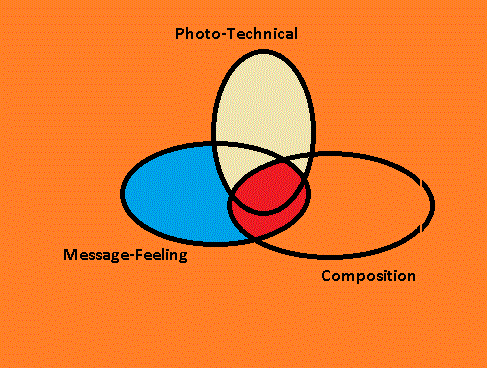
I came upon a kind of Venn diagram as a way of showing how the various forces interact with the "sweet zone" where they all overlap.

<I chose the following as you will see as three spheres or you could think of them as axis too, where a single photo has a "plot point" where it falls in relation to the three poles.

As you see I have chosen to represent the sweet zone as the center where all three converge but also where composition and "take out" feeling or message converge because here you may not start with a technically particularly good photograph.

This venn my friend ! It is aimed at when you are out taking shots, on a shoot, and what you should be thinking about when you are preparing for a shot, and what you may want to experiment with.

Technical is all about exposure and focus, but also you can include some post processing improvements: for me in as an E450 user, this means "Pushing the negative" like old days, shooting a little dark at a lower ISO 200/ 400 max and then pulling out detail in the shadows and altering the overall exposure in post'.

Composition revolves around two main concepts- does the photograph have a distinct subject which should be the emphasis of what you want to capture and convey? Or is there a wider composition such as a landscape, a street scene, a pattern in nature or a real Brugel-the-Elder image of the masses ? This is worth a blog in it's own right, in this blog then we concentrate on Subject emphasised images.

Are you then achieving an overall artistic feeling or a particular message you want to convey? Or have you found something new? Has post proc' editing revealed something, such as close up details, high-tone or low-tone, which you could integrate to your setttings and composition in the field  or studio ? This is worth endless bloggs - - as many as there are photographers and photographic shoots! 


You can also use this as a wheel: At the top of the wheel you have a simple check that you have at least the camera on a standard P setting or your preferred aperture or shutter priority. This is not taken for granted! My E450  camera holds the previous sessions software settings and at the moment that has been on firework and candle where Oly's art filters actually surpass my own manual and post processing attempts!


You can actually leave your last shoot by setting the camera to your preferred "Base Settings" to steel a rig tuning term from sailing- this is a good discipline. Or for example if you have a fast lens on ( f2.8 or faster) then you may want to set up aperture priority, max open aperture or fast shutter speed on S - if the camera has good-acceptable  high ISO performance then you may want to set this on AUTO - some cameras allow you to limit the range it hunts in, but this in most cameras means that it will go to ISO 100 in bright conditions and 1600 in dark.

Alternatively of course you have the scenario of the day, shoot or moment in front of you and you want to go through a quick sanity check of the best forseeable settings you then dial in.

Here I have split  the arrow  up because there are a series of relevant settings you have to double check to establish the technical basis for your shots : you have of course shutter as a real key here I will come back to, but if you are hand-holding on a non image stabilised camera then you need really 125th of a second absolute minimum for still subjects and 300th for moving subjects as a rule of thumb.  This means either selecting shutter priority and on my camera as above, AUTO iso or having a check of what the camera is offering you in shutter speed on P (programme).

The next is to think of the aperature and the type of depth-of-field you will be achieving with the lens: a fast sub f2 lens will require more careful selection of focal points on your subject and you may want to focus-bracket (some but very few cameras have auto focus bracketing  , alternatively you can use Live View focus peaking to show what areas are in focus on more modern Olympus offerings etc)

Here you have a scenario: taking a shot of a moving sports car on a shower ans sunshine day with the Olympus Zuiko 50-200mm f2.8 SHG lens on any E series camera except the newest E5 for this arguement.

1) Shutter- you will want to use shutter priority. Given you have cloudy and then sharp light conditions, if you are happy with ISO 800 then set this as a limit in AUTO or be prepared to post process darker images. 1/1000th up-over which will be placing you on max aperture which then of course affects DOF ( depth of field)  as does the telephoto length.

2) This lens has very fast focusing but on a sports car it may chose the wrong point and this lens is a PDAF optimised Sonic Wave Drive focusing which means that it will not track the subject and may miss focus on background in particular. Also you have the DOF issue with your chosen focal length- see below in composition.

So now you have a couple of options: a try and manually track the car and shoot - which should be okay on a shorter end at equiv to 100mm on a 35mm camera of old- a portrait legnth likely to be capturing the whole car on a fairly level race track.

However at the high end of magnification on the zoom,  when you are maybe going for a cockpit and driver shot, at equiv 400mm (200 maximum on the lens) then you may want to prelock the focus - you can experiment luckily with the beauty of digital cameras now- in two ways -

a) half holding the shutter- this is fine, focus on the piece of track you expect the car to run onto which should be fairly predicable and as the car approaches having second guessed this, fire off a series of shots ( oh you will want to have multi burst shooting selecting in settings- maximum frames per second upon shutter release until you remove your finger!)

You will want to select the centre point only in the PDAF focal menu

b) olympus hides a little focus lock on the AEL/AFL button which takes a bit of finding in settings and is really annoying if you leave it on BTW! However this gives you a hands free way of pre-locking the photo- it works the same as half depress but you use the AEL/AFL button / function when you have the point you want and then it is held until you press the button again.

The latter overcomes some of the issues that olympus has versus the superior Nikon DSLRs for example- olympus E-series  lens-camera systems can hunt and be too slow or select a point long in the distance.

Olympus really missed a simple trick for all their lenses which could have been a system update or integrated to the last few of E series cameras - E30, E620, E450 and E5: Focal Range Locking - which would limit the hunting on SWD and the Contrast Detect Optimised lenses to a set range and fire off a default shot mid range if nothing focuses.

The whole area of focus bracketing and focal range locking is very under developed in cameras IMHO especially for sports photography. Half release is of course a no-brainer for maybe 95% of enthusiast and pro' cameras  situations, but there are especially sports,macro, wild nature and street people photos which could benefit greatly from such in camera features.


4) Now you come to composition and that in this case relates to the zoom magnification and what you want to have in the frame. Luckily motor races tend to have warm ups and many tens of laps so you have time to experiment, but unluckily today you have vastly varying light conditions.

Composition here will be a lot about what your own preferences are, but you may want to convey more of the speed and drama. Back to the drawing board? Do you want a panning - blurred effect ?

5) You then want to consider what effects and artistic impression you are getting and if you are capturing what you want to from the action: which is just that- are you just freezing the cars in a non dramatic way, as if they are just toys arranged on the course?

Do you want to run off a hundred panned shots with driver cockpit- helmet as the main subject content of the photo? Do you want to separate out the back ground more by using exposure or angle ? eg a high key image where you white out the sky by using a low angle on the subject as the cars maybe descend a rise.

Aha, here comes in a composition basic- no zoom lens will get you into the best spot to compose your photo from - you have to get yourself there, and as above the DOF at the longer telefocal end may influence your choice of stand point and of course lens: you may want to back up to achieve hyperfocal distance on your subject, or move in to blur background-foreground relatively more.

Appraising Your Test Shots from "Brand's Hatch" Racing Day Shoot

Most likely you will encounter two or three issues with your first test shots today

1) Boring Composition
2) Technically Poor images
3) Poor Figure-Ground Separation
4) Lack of Artistic Merit or Relevance to Objective

1)  Boring Composition : I covered  this above so read back if your images are "so what!?" : it relates very much to the composition diametry- you either have a complete composition scene- in this case the whole field of cars, or maybe the cars and grandstand, that is to say the atmosphere: or you have the subject in which case you want to consider frame composition by zoom,  post proc' cropping and figure-ground separation most of all.

2) Technically Poor Images : This is likely to mean out of focus, blurred by low shutter speed or camera shake in this scenario of a day's shooting at the grand prix. Also it will mean that out of maybe 200 shots you have not framed the action correctly and you have cut off interesting parts of the image, included too much junk in focus, or worse, cut off the main subject.

Alternatively you may have good composition and good sharpness but poor overall exposure and subject-background isolation.

As this is racing a classic shot is the panned shot, and you may have selected the wrong shutter speed or you are composing and shooting wrongly or you need to run off many more frames to get best results.  There may be a surprising crop into a nice blurred action you did not expect to find in post, but adjusting for the day and your vantage points is the best option when you can take many shots as the race is in dozens of laps.

Many technically poor images on first appearance can be improved in post processing, or in this case, on in time for the next lap: Taking post proc' on those 200 shots you have:

a) Cropping into the action. Zoom in around and try cropping the hell You may need to add a dramatic effect such as monotone or high grain, or single colour pick out to make the crop work because you may be going into a "gainier" image ie really getting into pixel prominence or noise being more evident from high ISO images, or you want to achieve better figure-ground separation.

b) Blurring further! You may enhance the speed by blurring the subject more and do a post' proc panned effect for example.

c) Isolating the subject out by various effects: you may have cropped down to the look on a driver's face but in Olympus land the DOF is likely to be including the coweling of the engine and maybe even the crown behind are not as nicely out of focus in the Bokeh you may get from an FF:

c ) i) here you can isolate by blurring- using a mask or just freehand in post proc' as blogged on before

c) ii) or altering the exposure - the kind of reverse of all that hyper-dynamic-range fad : you constrict the dynamic range ! In other words you adjust either adjust the whole image such that the subject stands out more by utilising a high key or low key effect. Or you mask as for blurring.

c)iii) altering the colour over all or in selective masked sections: This could be very effective in motor racing- a monotone image may reduce the colour pollution in an image which portrays something of drama - the eye is lead naturally to the action. Alternatively you can mask off and selectively colour as has been trendy since Schindlers List!

4) Lack of Artistic Merit or Not Capturing your Objective

This comes back most of all to boring composition, but also to a combination of the above. Back off here though- do you want to actually capture the whole atmosphere and drama of the day? Can you take shots of the pits with the expression on drivers or mechanics and team-manager's faces ? Or the crowd? Individuals or a whole mass of people who are focused in awe at the cars or celebrating on the chequered flag?


Recovering On the shoot:

You may then come back to run off some shots on the next lap which give this improved effect in camera-

i) cropping ? - move closer or use a longer focal length, put a longer lens on. Take more shots on the subject you want to get- I suggest a) interaction between several cars 2) single car action  3) Driver close up

ii) figure ground separation ? - move lower for example to isolate against the sky, or higher to isolate against the tarmac or grass or banner boards. Use the highest apertures and the longer focal lengths, backing off if you need to in order to get the right isolation of subject. You may then also experiment with for example spot AF, low key, high key or manual adjustments by wheel turns from the programme mode or  fully manual .

iv) capturing an artistic feeling: the classic is of course a panned shot where the subject  - car or driver close up - is acceptably sharp while the back ground is panned out to a blur. You maybe only need to be down at 1/200th of a second to maximise the combination of panning, capturing and being able to take several shots in the second or two "window" you have to track the car. Alternatively you may want to use zoom blur but on the SWD lenses I do not know how this goes!

Other classic things are to shoot in mono and single colour retouch: You can convert all to mono later, but in camera it will let you see which exposures are most dramatic and technically acceptable as well as how much the composition may be improved by shooting mono and removing colour- pollution.

Other treatments would maybe to focus on portraits and groups of people shots rather than the racing itself.

Another basic approach could give very big artistic and dramatic feel: by getting lower and using the sky to separate the image, lending itself to high key images with dramatic over exposure and good subject isolation. This is most appropriate if you can get a shooting angle up towards the crest of a hill. The alternative "low key" is to have a high vantage point and use the tarmac to isolate out the subject.  On this point, you can then use the lponger end of the 200mm SWD SHG lens to compress the images, where cars appear closer together and this is very effective when combined with the two vantage angels, lieing down low and semi ariel in particular.

In the cold light of the day after or evening pouring through the hundreds of images, you may get your biggest learning points. However out in the field, get your camera into the shadow of your coat over your head and start to check the technical IQ of the images on the camera screen, or tablet if you are on a wifi enabled system; and see if you have sharpness, any nice crop potentials, or if you have acheived good panned shots, and think about the over all composition and exposure.

In the E system cameras bar the E5, you tend to be able to save an under exposed image more than an overexposed image, so you can play with shooting faster and darker or avoid high key.

In our example of cars moving at up to 220 mph you luckily have hundreds of photo-opportunities but don't get blazee. Are you capturing good shots? Are you near enough? What is going wrong technically ?

===============================

I hope in this little blog to have stimulated thought and given a simple three-axial tool to help with your photography and your post processing.

It ran right into a perfect example for the E series Olympus DSLRs with the classic 50-200mm SWD SHG lens and this then illustrated my points very well by in large. 


onsdag 21. september 2011

BW Grain Experiments in GIMP for JPEG Images From the E450 Olympus DSLR

Black and white images out of the camera can be dissappointing, and even more so when they are "monotonised" or de-saturated from colour shots. There are several very comprehensive bloggs and chapters in books about getting effects which mimmick some of the classic photo journalist and artistic shots from the hey days of ilford fp5!

In this blogg I will offer a simplified, very quick approach to adding a corn or heavy grain effect to images. In the days of film, the grain was often caused by photographers "pushing" the negatives or prints to make a dark image captured at silly shutter speed, light enough to get in print. Alternatively, the enlargements were of a small area of the negative, or they used a small negative in the first place, like the original PEN crop onto 35mm.


Firstly you will need a texture background with an element of random grain and you can create these yourself at vast hassle or get one like the png file from http:byscuits.com ( it is a big file and will slow your browser down) grain-400tm.png. Dave Gandy has hosted this big png on behalf of the owner, and has this as a kind of traffic dirivng advertisement for visitors. Thank you both Petteri S, and Dave G . for allowing this to be shared.

This particular image has some "Hairs" on it and is actually quite a fine grain. It is like an ISO 400 film I beleive, and at that level of "push" in BW you don't get the real effect- a half way house between sharp, natural textrure and impressionable grain.

1) Open and Adjust the Grain Image to Corny-ness, size and Orientation.

So the thing to do is then open this in GIMP and then clip out a section to be rescaled and therefore have more visible corn. The grain 400 png is about a 20mpx scan, landscape so you need to go to a small crop in order to get a heavy grain effect for a 10mpx image in the case of the E450.

Open as the first image, clip to between 10 and 25% of the area with the tool to either portrait or landscape rough dimensions. Then use in the image pull down ( scaling layers does not work to scale the grain once you have two open). To super impose this grain on a landscape it is W3648 x2736 for the E450 at 10mpx jpeg, and conversely 2736 x 3648 portrait 90'.

At this point it is worth saving the grain crop scaled to 10mpx, and probably worth making a set of different grain densities in portrait or landscape orientation. PNG is fine, but an xcf layer ( gimp's own bitmap with extended information on process) is as good or it can be okay as a jpeg.

2) Open The Image You Want Grain / BW onto as a Layer


Gimp seems to detect that the png layer is monotone and converts the incoming jpeg from colour to BW automatically: but if it does not in your case / version /universe then you can just select that layer alone and choose - desaturate - from the colour pull down.

If it is not open already, use CTRL-L to open the layers dialogue box.

3) Adjust your image layer tonal curve

If you are au fais with using the tonal curve adjustment then you should adjust the contrast upwards in that way, and also see if there is some quality of the image to be gained in the individual R-G_B channels. If you are a simple mortal just into GIMP and no more, then use contrast slider until you like the image.


The image will lose a bit of contrast and brightens when the grain layer is merged in, so you need to experiment and make sure you are looking at the layers properly: image on top of grain background, both "eyes" on in the dialogue showing they are both visible when you want to see the combined effect, and only the image is visible when you adjust that alone.

3) Adjust opaicity or use - Grain Merge -

This is the reverse of transparency. 95% is then only 5% see-through. Adjust this using first the "Normal" selection in the mini pull down on the Layers Dialogue window.

As stated you will lose some contrast which you then have to compensate for, and you may eventually need to darken or lighten the grain layer in order to get the desired texture.


You can then experiment with all this, but GIMP has done much of the job for you in mergign texture without altering the contrast too much, employed via the same pull down, quite far down the list you will find " Grain Merge" and this instantly shows the merging of the texture to the image : it still does change the contrast, adding some white and grey quarter tone noise from the png file: but you can then adjust the curve of the image more subtely and see the result directly

3) Save An "xcf" File " Save a copy..."

when you are near finished, do this: it is worth doing underway too, so you can trace your work back. FOr example if it was the grain layer which really messed up the contrast

4) final adjustments.

Fine adjustments to the curves, any sharpening you feel you may want ( with threshold above 8 pixels so the grain is not "worked up"). In the byscuits grain png there is are abberations, notably hair lines which have white trails left on the image at some point in its processing.


5) Merge down and Save

Merge down is the final thing you need to do: when using GRAIN MERGE you get a perfect preview of the merge, while with semi opaque you can have an issue sometimes with final versus your impression from viewing the layers.

If you choose to save a copy now as a jpeg, then it will merge and export to jpeg., leaving you free to save as an xcf and also work backwards in "undo-s" if when in the cold light of day you hate it all!!

fredag 9. september 2011

Extended dynamic range using Layers from Bracketed Exposures 1.

One criticism of the 43 sensor is that it has limited dynamic range compared to mid to high end APS-C sensors. This means that highlights become white blocky areas and lose realism, and shadows the same in dark slabs. In fact the criticism is that the top of quarter tones, light with detail, and the bottom of three quarter tones actually disappear into highlight and shadow in an otherwise well exposed shot, leaving an area which is unrealistic, in being blocky, posterised or marked by noisey speckles.

In a perfect world we would have sony's sensor qualities in the D7000 in four thirds, and there will be progress in this at least within 12-14 megapixels according to many enthusiasts who know a thing or two about quantum physics.

However we want to acheive what we can within our limits or as part of the challenge of mastering our equipment and post processing (post') technique.

A simple means to capture more dynamic range is to make bracketed exposures, and then layer them onto each other. The top layer or even several layers are made partially transparent.

The best technique is to use a tripod and take three immediate shots, especially in daylight so conditions and shadows will be as near as possible between each bracketed shot. Most all enthusiasts cameras bracket on increments (+/-0.7 is a good starting point, giving three bracketed shots). Otherwise cameras often have an exposure adjust, which allows for slight under and slight over exposure to +/- one exposure step. A simpler but less effective means of doing this is without bracket function is to set the camera to aperture priority and simply take one shot "right" and two other shots either side of that. Alternatively you can as I have below, set up manual exposures which vary the depth of field as well as the overall exposure.

From the cameras own LCD /LED screen it can be difficult to judge the exposure of each shot, but you can see that some are quite dark while others become too bright. You can look at the histogram to see if there is a large skew to the last 5% of either side of the scale. However some overly dark shots on screen actually have a lot of detail to be tweaked back out of them.

So I recommend setting up with a tripod and running lots of shots: get a feel for the depth of field ( we are going to consider a long depth of field which gives a sense of "realism" in combination to extended dynamic range). The second advantage of a tripod is you can shoot unusually long exposures in daylight @f18-22 or in addition an ND or polarising filter.

Example Using Gimp

This is my next experiment, having come a long way in adjusting jpegs in curve work, sharpness and so on. It helps if you have worked in layers before, but in fact this can be the simplest use of layers (as apposed to the long route to masking to blur a background in an earlier blog).

For my first ever venture into layering for extended dynamic range, I chose some night shots with very long exposures. I wasn't happy with the end results in either of two exposures : one was too dark and the other was light and soft with flat highlights around some nice period style lamps.

I wanted to try several exposures but on the laptop I wasn't pleased with either of the two "keepers" from the back of the camera view. However both had their merits. So my first fodder for a long awaited experiment.

So what came out of the box??


One too dark: maybe a lift would help it, but then it may lose depth and realism. The other one is about right, but a bit too soft and short a depth of field. Also the highlights are overcooked around the detail lamps I wanted.

Try One: Dark onto of lighter: shining through?


Okay, so these have uploaded not so great but you can see there is a subtle extension to the DR in the merged down shot, dark ontop of light with about the right transparency (sorry I forget if it is 60% + or under 30%: experiment yourselves, use undo to get back !)

The highlights are still blown and the detail is not sharp. A kind of worst of both worlds but the exposure is better.

Now the reverse: a thin, 24% light layer ontop of a 65:8:5 sharpened dark layer which was lifted slightly in the shadows. The light layer on top is slightly dropped on the highlight peak (lamps of course)


Now! Here I have had quite a plasticy looking "dark" layer once sharpened, but the feint light layer is merged down at 24% opaicity it unexpectedly softens it nicely. The main aim was to lift the shadows.

Any benefit over just one image worked up on curve and sharpening though?? Well as mentioned the sharpening which hardened the details on the lamps, balcony, woodwork etc would be too intrusive while the image with the best DOF viz the darker, if chosen would become noisy and dull when lifted so much!!

I have heard of layers being used from negatives in the dark room, suppositioning several exposures onto one paper. And of course it is the origin of the colour process!

So I am pretty pleased and once again I feel a little of the magic that people had 30 years ago and longer when an image would appear out the baths magically.

Here is the image larger below because I can see the compression is killing the IQ : however you can see what I mean above in all the shots.

fredag 19. august 2011

Hyper on Dynamic Range

Even photography itself, in the days of degeurrotype, was a novelty and a little bit of a gimmick.

Many of the gimmicks and fawcets of cameras, films, lenses, filters and now sensors in their path of evolution have come to roost as established styles and techniques.

Probably what is the latest of the emperors-new-clothes to many luddites, is Hyper Dyanamic Range in post processing and the latest enhanced, broad dynamic range nascent in-camera, surpasing that of the human eye even. HDR is here to stay.

DR- dynamic range a measure of the extremities of light intensity which can be captured on the sensor and subsequent image file for the given exposure. This means that the nuances of light and dark extend so far as becoming pure white, or pure black shadow at a given upper and lower level of light intensity.

What is actually equally important to image quality, is tonal depth. Despite modern digital cameras proporting to have the same technical tonal depth in number of bits, different cameras render these better in RAW and in-body jpeg. Combining a wider DR with excellent TD means that more detail and nuances of colour and brightness can be captured.

How does this add up to the pretentious and contentious "IQ" ? Well you can argue a lot about subjectivity in this, but if you are a 10 - 12 mpx Four Thirds / mFT owner then you know all about limited dynamic range. Blown highlights where large blocks of white make a very intrusive presence on photos from scenes with high contrast taken on an average or subject spot exposure.

High or broad DR means you are capturing more tonal depth at the extremes of the intensity of a scene. This can now surpass the ability of the human eye, leading to a slightly surreal or jamais vu feel to especially dawn and dusk images. The additional nuances allow us to see more detail and more texture. This means the eye, sorry brain, picks up on additional qeues for depth and interest in a shot, and basically makes the perception of realism. Alternatively the surreal or the presque vu or jamais vu come through.

Okay now I am getting a little arty and subjective about how good DR and corresponding TD make for a good shot. Essentially good DR also means that more of the scene can be reported as being properly exposed or at least "pleasantly". When combining several images of different exposures as layers in post processing software, the very best of each can be employed in a final image.

Technically you can measure DR and tonal depth as finite, and DR from the various tests is often worth looking up for a camera you want to buy, and comparing to in particular the excellent DR of the Nikon D7000 and the Nikon D3S and then to rival models vying for your hard earned wonga.


But what about doing your own HDR on a four thirds camera? We want to avoid both blow highlights AND heavy shadows with in my case, the Olympus / OEM CMOS "red spotted dabs" syndrome in shadows and highlights.

Here is my next experimental path in The GIMP, starting asap, as expressed by JPMATH on flickr.

jpmatth (70 months ago | reply)


here's the entire process, simplified where possible:

* set the 20D's auto exposure bracketing to 1 stop.
* stand really still, and squeeze the shutter until three shots are taken (that would be 0, +1 stop and -1 stop). try not to move the camera (didn't have a tripod with me).
* developed each RAW file with the same settings (with recipes in DPP), and exported to highest quality jpeg (to retain the EXIF data).
* opened the three jpegs in gimp as three separate layers, with the 0 exposure at bottom, then -1 on top of that, then +1 at the top of the stack.
* moved the layers around until each element of the scene lined up as much as possible (because i was handholding, each exposure was a few pixels off from the others even though they were taken milliseconds apart)
* added transparent (black) layer masks to all but the bottom layer
* painted white on the layer masks where i wanted sections of each layer to show through.
* flattened everything and cropped the edges where the misalignment was obvious.
* a little unsharp masking to hide the slight softness of the misalignment
* saved to a final jpeg with quality at 90, no smoothing, subsampling at 1x1,1x1,1x1 and DCT method at floating point.

torsdag 6. januar 2011

Living with the Limitations of the Olympus E450

Now I am not an Olympus fanboy by any means: I rather do not like the PEN direction and pricing.

And so I chose a camera to get a little system together and was happy to learn its limitations.

This was really the way it was in 35mm days, with "knowing the limitations" being many of the same as I find, but more centred around the film you used at the time. Re-spooling was a risky
business ( I lost a couple of half rolls in winding back and one film end caps failed!) , so multiple rolls just to "get the shot" with a higher or lower ISO, or FP4 was the
reserve of pro's and pseud's.

Technically, Olympus E system score poorly (DXO amongst others- However, they test only older and the basic 14.42 lenses and seem overly Nikon biased for an "independent". ) while in reality the E system continues to deliver very good images. Perhaps this says more about the type who choose Oly, and the quality of Olympus glass, the JPEG engine and the pre-RAW engine which does deliver improvements in red-RAW bitmaps apparently. Maybe most Oly owners are a little longer in the tooth, like me, with a love affair going back to OM2 to 10
days.


So what are the limitations, or irritations of the E450?


1) Programme shift needed to speeden up P's shutter choice: the standard programme apertures and shutters are biased very oddly to slower, more shut down settings. You can twiddle the shutter speed up by using the wheel in "shift" Ps , but this is poor, I mean it should select for a reasonably fast shutter in the presumption it is a hand held shot.

Shutter priority is fine but it will just flash when the shot is over-under exposed, and not take the shot. mode relies on the very poor C-AF so is no get out of jail.

This has ruined many of my hosts in the poor winter light, whereas I found P with AE BKT to be so good in the strong summer and autumn light : see last point!

2) small ViewFinder; this gives me issues with perpendicular / horizon sighting and overall usability. However I prefer it over not having one! I did not see the big issue with the EVF on say the S1800. I will test a GH2 soon.

3) blown highlights : known on the 43 system; but in fact other DSLR do this. For that matter
fujichrome 200, my winter transparency favourite had often blown highlights or featureless skies too. Highlights as big blocky white areas are ugly, but using AE BKT can help get the best shot, or best combinaiton of layers if you are on a tripod and using PS / GIMP later.

4) FPS with Raw in combination with JPEG becomes quite slow, can be down at 1 ps.

5) No "in body image stabilisation" , purely jealousy, but even some tripod shots have been
blurry. The IBIS makes up for highlights and poor high ISO on the 520/620 cameras...which brings me to my next point......

6) poor mid to high ISO : this relates to being able to push the camera a little to get faster
shots or avoid using flash. Relative to newer cameras, like the D3100 and the 450D, this is a
decided weakness. If I had a 520 though, the IS makes up for it. Also, shooting in BW helps, because most of the noise is red specle, and this seems to be practically eliminated in BW for ISO800 and even 1600 "at first glance" ie normal viewing, not navel-gazing.

7) Mirror lock up is tempory, it should cover several shots with a choice. There is the
"antishock" ( lock up in Olympus' speak) over multiple exposures, but it flips down wasting time
inbetween shots.

8) focus can be slow, and C-AF is poor. Olympus are not known for their sports images these days, because both Nikon and Canon have superior focus systems which cope with fast moving objects across the frame.

9) NAGGING WORRY THAT THE S-AF IS OUT OF SYNC'. This is most likely because I can no longer enjoy 320th of a second in the weak mid winter light. I did test it with a tripod on a semi distant object, but the atmospherics weren't good enough actually. I always find a shot I am happy with, but so many are not keepers in the winter. A 12-60 or an f2 prime may well help my worries, and in the first place this may be cheaper than finding a service agent in another country.

I wander around test images on Flickr and DPreview ( which is mostly a tedious, untalented source or technical appreciation shots around the house, office, garden or "block") and I am suprised that some camera EXIF selections come up with a lot of rubbish, while others like say the Fuji S1800 super zoom, have a whole pile of really good images. If I'd had the budget I would have either got a PEN a GH2,. Even between olympus E cameras: the 450 is good, the 52o really very good while the 620 and E3 are suprisinly poorer composition and overall quality.

Understanding your camera's limits helps inform your overall skill and handling of cameras in different situations. Furthermore, it is invaluable when you choose accessories and expand lens systems or like me, come to buy a second, back up compact camera or move system.

Later when I do have a better camera, I will still understand the technical challenges of some subjects and scenes and take a little more thought into getting some good frames. Now I am more comfortable with the limitations of the E450 I can advance my concentration and ability in the true core of photographic art, composition.

tirsdag 30. november 2010

Anyone for an E530? E700 ...do I hear any higher bids?

Following on from my last ranting blog, which is based on a lot of social media buzz about how sthooooopid oly are in ditching the hobby DSLR range, I wonder what features we would all like to see in a 2012-13 upgrade possibility as a DSLR from Olympus? An E530 or E700 possibly for us and PEN owners to upgrade to?

Here is my wish-list for the "E700"

1) FT. Stick to FT; even the kit lenses out perform micro.

Give the E5 or later top end some feeder customers, and give the E3 and E5 owners a back up body!

2) At least 14 mpx for a 2012-13 launch. Ignoring the "space race" arguements , more mpx has practical advantages: for example with an electronic shutter, using a crop ara of the sensor for much higher FPS while still producing usable images is good for sports, scientific applications or just plain enjoyment. While on needing more mpx to allow for cropping "in-camera", digital zoom for that matter, with built in image enhancement from the crop area rendering to an 8 or 10 mpx output.

I crop about two thirds of my "keeper" shots in "post" processing, and there are some gems to be had from cropping. The GH2 has an innovative use of the larger sensor to deliver better one shot panormas for examplke. Having just a bit more mpx to work from is like having two f stops and 40mm extra FT on the front end.

To be serious in 2013,Olympus will need 14 megapixels as a bare minimum; they can't keep on trying to educate the market that 12 is plenty. The market will leave the lecture hall.

3) A single replacement for all the current "E" hundreds. This would be a senisble marketing strategy: this would mean that you capture 400-600 and E30 upgraders already in the system as well as being able to focus all your NPI yen into a camera which can perform at the price point of the D90/450D and the likes today. Oly' could base some variants, suggest titl screen and HDV, on the same body and core production line tooling, rather than having three lines.

4) Great ergonomics: improving grip from even the reknown 520. Great hard buttons and user interface: and more on that below:

5) Compact size: smaller than the 600. This is a stregnth, keep it going, stay on FT's script.

6) A big view finder: the optics or EVF (god help us) prism-hood area does not need take up a huge increase in volume like we see on the otherwise over grown E3 and E5.

7) Communications: an "i Olympus": FaceBook ready, flickr auto sync....okay I am not generation "i" but I crave this: put up a VGA sized image with high contrast and sharpness on the internet in no time. This means WiFi and even a 3G/ LTE capability. Then maybe some more generation "i"s will buy in.

8) user definability and programmability. In respect of things like toggle buttons which can be user defined, and other things like combinations of more than two image storage types. Also complete user definable modes which can be selected very quickly: for example, user defined output for web ( as in 7) with a high contrast, highly sharpened VGA image output. Sports, with a default range of 30-50m, IS on, high ISO and highest available shutter speed and FPS. BW mode, tripod mode and so on and so on.

I have taken some torturous routes to customise the 450, see previous blogs, for things like fill in flash one touch which are a pain! Also being able to set output to a prefered image treatment: sharp, high contrast, colour balanced etc, even curve work which can be optimised in post and then back programmed into the camera as an option or like a third JPEG output.

9) Improved AF; focal range locking ; much better C-AF and the option for traditional ground glass-split prism manual focusing as an upgrade/ version of the camera: why not?. There is just too much good OM glass and other usable stuff from the SLR boom of the 1980s lying around! Focal range lock would be a useful short cut to getting more performance out of the current rather simple AF system, and would help live view immensely.

10 ) Touch Screen - Button User Interface picking up on 8 and 9 and 7, 6, 4........a really good user interface, in both hard buttons and a touch screen. . Simple things like pinch zooming in LiveView and Playback, double click-touch to select focus target, two wheels, a "super toggle" button for the right thumb to get onto easily. A front mounted focus range lock toggle button. Focus hard lock with a simple means to do this for fingers off waiting for the subjec to come into shot....As in 8, the abiloty to communicate directly, and programme the camera from a laptop while retaining other settings or defaults as a fall back.

Shape and Package

All this in a sub 1000USD body....throw in a new kit lens with f2.8 performance.....and do that 100 f2.0.... I don't need a flip screen or video...make those later upgrades or a G2/GH2 set up, the same camera basically, two different OSs so to speak.

The WIfi or maybe just the 3G could be put in the extra battery and features "drive" which would plug into the base. This could also have an SSD drive with a SATA cable.....more SD ports....okay it would be cash to splash, but a good upgrade. Even the thin iPod touch and most slim smart phones have WiFi so why not us?

Another market such a camera would address, apart from E400-600 upgraders and new buyers, would be E5 owners (E6 by then?) looking for a back up body, or actually considering the camera as a feature-pack and mpx upgrade. Of course, PEN users would see this as an upgrade and need to start buying new glass, while keeping their PENs as back up/travel camera.

The deployment of an EVF would be difficult for many, and given it needs to stay full FT, a bit of an irrelevancy without some ehanced benefits in this feature anyway.

Olympus: ask a thousand users to consider various options, mine are just the obvious ones above, and then come back to them with a MOSCOW purchasing regime: what MUST they have, should and would. Coupled to a high intent to upgrade from Ex00s and other marques, this would be using ears to the market.

mandag 29. november 2010

Black and White and Sepia All Over


Why take shots in monotone ?

All digital cameras I have used ,or looked into in the last five years seem to have a black-&-white feature which takes the BW as the saved image. Most have a sepia function for this or to apply to images in camera.

Obvioulsy these are converted from the "colour"digital- info in the bitmap, which is extracted from a RGGB grid pattern on the sensor chip. With BW and a myriad of related monotone or tinted possibilities in software ("Post" as the anoraks call it for post photography processing) why set your camera for MONOTONOUS pictures?

Firstly, to avoid the monotomy.........or rather the mundanety. We are all used to so many colour images with very saturated skies, seas, neon signs and t-shirts that a BW image can truly stand out. Another reason is that the SUBJECT in the BW image has a chance to stand out.

Secondly, when you see the opportunity to use BW, then take it and don't waste time in the "light room" later.

Subject.

Technically speaking, the advantage of taking BW sometimes breaks down into figure-ground effect and removal of colour noise: the two are usually present in good shots.

Figure-ground refers to subject:background separation: we DSLR owners like to think we are terribly clever by setting an open aperture and throwing the background, and sometimes forground if we are super clever. However especially on the Four-Thirds system, depth of field on some lenses like the 25mm pancake, is too deep to separate the figure from the background. Changing over to a longer lens helps in ranges of up to 200m to give a shorter DOF at a relatively higher f stop like f5.6 ( the 40-150 is very good at this: the 70-200 is an excellent semi pro lens).


Colour is more obvious for exposure shots.
There are different approaches in these situations of longer DOF than wanted in making the subject stand out and in the studio of course lighting : in the field this can mean trying different metering and bracketed exposures ( see earlier blog on spot metering and AE BKT) to get a contrast in lighting which makes the subject stand out from the fore-and back-ground. These two images use spot metering, and also Bokeh, but it is the exposure ( in "broad" winter daylight, with a low sun) which makes the subject ping out at you.


In terms of choosing to shoot BW ( or sepia as I have set defualt BW shots to be) is often a bit more subtle to interpret as an opportunity for setting the camera to BW. However it can be the "no go, nah, there is too much going on there....I can't get figure ground separation...the colours are clashing or unattractive. If you have thought this far about any potential shot, then something caught your interest, but your sense for composition realised there was something cluttered. Try monotone on a bracket.

Here is are some examples of subject emphasis using BW

1) "Lucifer "

It was cold and I didn't have time to rearrange the wings, but I saw the meaning in the image immediately and chose BW. The green clover and grass disappear to become a texture in a shot with no desire for any DOF effects.

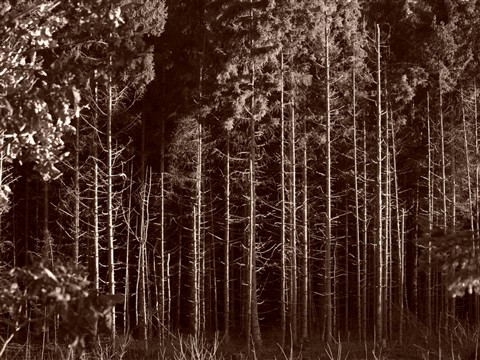
2) As if by magical moonlight

This was in fact in full daylight, with a low winter sun, just after the title shot was taken. There was something very forboding and threatening in the trees with this light, very stark and I knew right away to leave the camera on BW. Colour would have been nothing in this shot, just woods.

The subject here is the vertical pattern of the trees, but the whole picture takes on an atmosphere driven by the lighting.


3) Dog


This is a very half to three quarter tone shot ( just above full shadow) and shows off the Olympus tonal depth and dynamic range. The background qould be just too confusing _ green brown, onto the beige dog, a reddish scots pine to carry the eye away....just a snap shot which took on a life of it's own, as the dog, a deer hunter, seems to be part of its environment and we are the ones looking into a darker nature lurking in the animal.


Now for some quick comparison shots'


A slight crop and this time in GIMP, BW with heavy contrast. Alklk the noise is gone: you want to look at the mans eyes and weather beaten face.


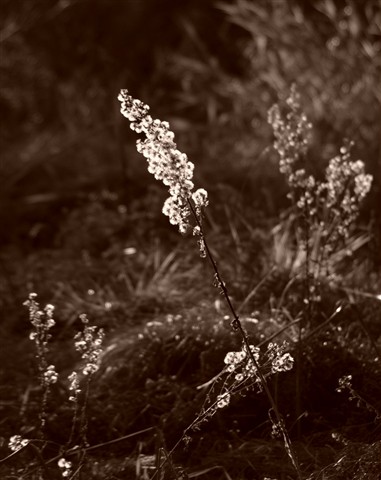
Back to the title image "flurry" : taken in colour it lacks some impact, although it is a nice shot you can "feel" the downy seeds almost.

In BW, in fact you almost get deluded to colour being side by side here, but it clears out the cluttered background and brings out the central subject with the crescent of compatriots around it.


The image on the left gives a nice figure ground separation when the 25mm gives too much depth of field, tending to the infinity focal legnth. On the right, a slight over exposure "lights up" the leaves and grass


I think one thing photographs should convey is a wish to be there, not just as if you are there, but that you would like to be there to feel what was going on in the frame and around. I'll leave you wiht an unremarkable shot which does a lot for that, perhaps reminding us of those moments when we see beauty in that which is purely simple.

fredag 26. november 2010

ISO Noise? E450 Not So bad


The E420-E450 are entry level cameras and the main criticism against them is noise at high ISO. The image above is taken at ......can you guess? An overcast winters' day, handheld. Good capture of tonal depth, true? Muted colours, but near to real as I saw them.

Compared to using an OM series with the 1980s slow and colour altering zooms, then the E450 is positively way out there ...if you have a time machine.

Today people don't keep cameras or any other electronics very long really. Product user-cycles and the marketing life cycles are just a matter of two or three years. Also, comparability and user advice on the internet leads to PNS-envy. People publish shots of the office block over the way at night, an umremarkable sunset taken hand-held, and so on and tell you that high ISO performance is a must. well to get that and good dynamic range AND tonal depth AND 5 fps, you need to splash the cash.

Admittedly, you will get better sports shots, maybe a the cost of fps though!

Get real: you can buy the Olympus E450 for less than most " mid to top end" compacts from Canikon: it has limitations: you need a tripod and desire a monopod.

Noisy Night Shots?

Well, use a tripod. ISO 100 is always a setting you can limit the camera to.


Noise in the Day versus Hand Held Camera Shake


A detail from the first image.


Can you guess the ISO yet?

A little bit of grain gives it away as higher than 100 or 200, but this is actually 800, allowing for a reasonable shot in poor light with little noise: handheld.


Shot Two 1600 ISO


The grain is there and the noise is in "banding" or super-pixelisation and red flecking. However as a small internet image it would be completely acceptable, given there had been better light in the first place!

ISO 200

The issue here is not ISO, it is a dark image at just 1/25th of a second. Solution? A tripod before you trade-in for an E620. Good tonal depth giving a feeling of realism, while it is under exposed and not worth saving by curve work to be honest.


ISO 100


This is actually brighter, but one of maybe 12 shots to get enough sharpness at 1/10th sec while handheld. The issue here is DOF: it needs a bit more DOF to give roundness to the front apple which is the subject of the image. This means a high f stop....and manual IS ... viz a vis a tripod.